Purpose of the Skills Matrix
The primary purpose of the Skills Matrix is to empower organizations with data-driven insights into employee competencies. It bridges skill gaps and supports training initiatives to boost overall productivity. Using the Skills Matrix ensures that organizations have a clear understanding of team capabilities, facilitating informed decisions for employee development, and aligning skills with strategic objectives.
The Skills Matrix for Job Roles identifies training and non-training requirements for learners, facilitating operational compliance and competency assessment. Job Roles are versatile and can be applied in various contexts, such as tracking work permits or upskilling for specific positions. They ensure learners maintain mandatory qualifications and provide a user-friendly interface for tracking progress and requirements.
You can use the Skills Matrix to quickly:
- Identify skill gaps and areas for development.
- Ensure compliance with mandatory job requirements.
- Plan and monitor employee training effectively.
- Align workforce capabilities with organizational goals for continuous improvement and success.
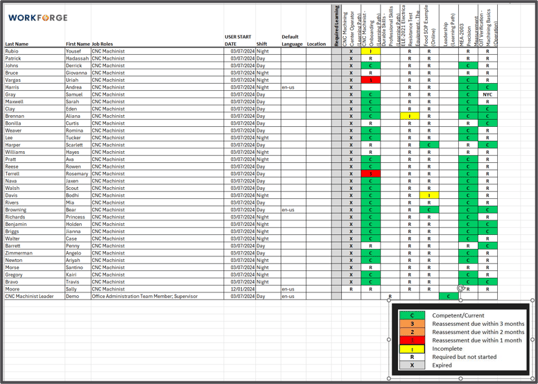
Skills Matrix Legend
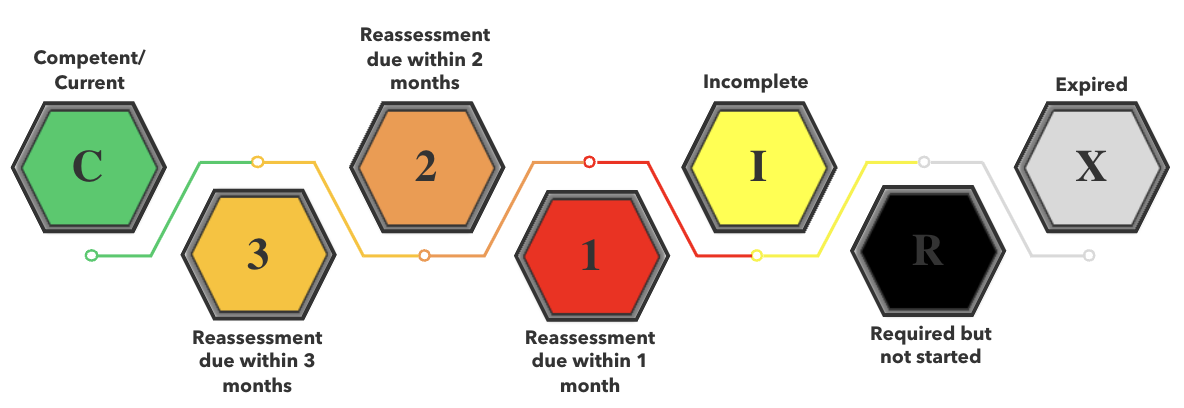
This image provides a clear breakdown of the skills matrix codes, offering a quick reference to understand their meanings and applications
- C - Competent/Current: Employee meets the required skill level and is fully up-to-date.
- 3 - Reassessment in 3 Months: Skill needs revalidation within 3 months.
- 2 - Reassessment in 2 Months: Revalidation required within 2 months.
- 1 - Reassessment in 1 Month: Skill expires in 1 month; urgent action needed.
- I - Incomplete: Training or assessment not yet completed.
- R - Required: Mandatory skill not started.
- X - Expired: Skill is no longer valid; revalidation is critical.
Using this legend, you can efficiently identify various statuses with clarity, enhancing both visibility and precision when navigating the matrix.
Use Case Scenarios
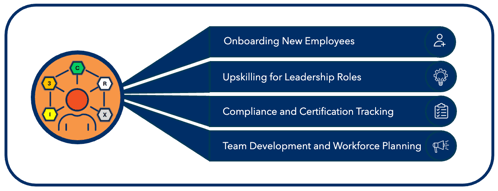
The Skills Matrix can apply to real-world scenarios, demonstrating its value across key workforce management areas, like:
- Onboarding New Employees: Streamline training for new hires, ensuring they meet compliance requirements quickly and efficiently.
- Upskilling for Leadership Roles: Identify training needs for employees transitioning to higher-level positions, such as supervisory roles.
- Compliance and Certification Tracking: Monitor mandatory certifications for regulated industries like healthcare or manufacturing.
- Team Development and Workforce Planning: Align team skills with strategic goals, facilitating targeted development for organizational success.
Report Examples to Pull from the Skills Matrix:
- Job Role Competent Users by Shift: Use this report to only list the users in a specific job role (for example, Maintenance Techs) that are competent in a certain Learning Path (for example, Electrician), who are also available during a specific shift you need filled.
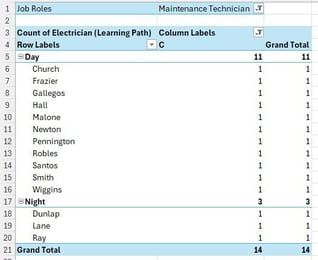
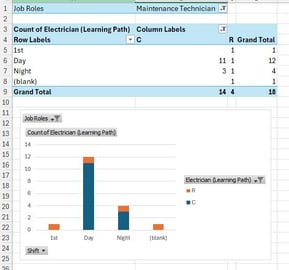
- Job Role Users: Use this report to list the number of users in a certain job role (like Maintenance Technicians) and the number of users that are competent (marked in the report by C) or required but not started (marked in the report by R) in a specific Learning Path (like Electrician). This identifies the number of Maintenance Technicians and their status associated with the shift. You can see that the Day shift has several users that are competent. The night shift has only three that are competent, and nobody is competent on 1st shift.
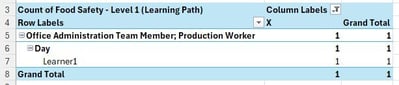
- Users Who are Expired in Certain Learning Paths: Use this report to only list the users that are Expired (X) in a specific Learning Path (in this case, Food Safety - Level 1, so you can quickly see who needs to be re-trained.