
This article applies to System Admins and Team Admins.
New to Operational Assessments? Start with What Are Operational Assessments?
Creating an Operational Assessment
An Operational Assessment has two parts:
- A Content Object where the Content Type is Operation
- An Offering where the Modality is Operational Assessment (OA)
Step 1: Create the Content Object
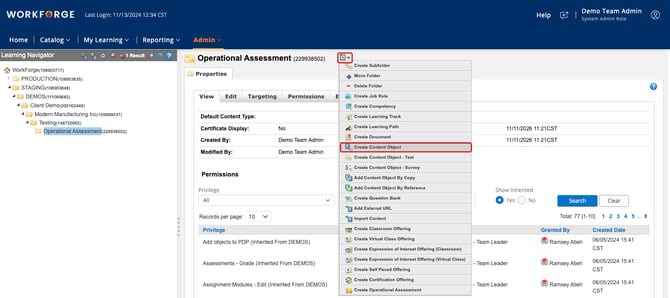
From the Learning Navigator, select the folder where you want the Operational Assessment. From the folder’s menu, select Create Content Object.
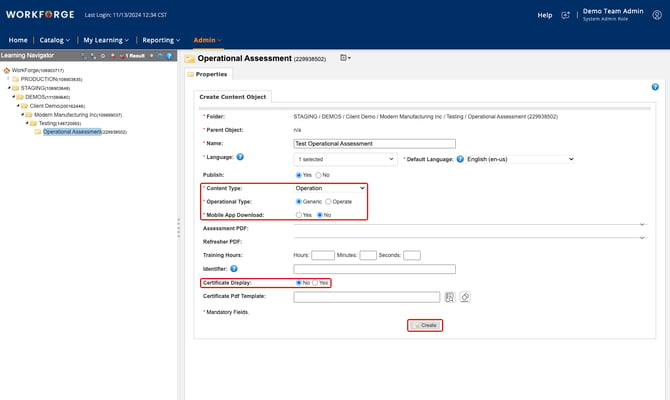
Complete the required fields, including:
- Name: Enter the name of the assessment.
- Publish: Select Yes to publish now or No to publish later.
- Content Type: Select Operation.
- Operational Type: Select Generic.
- Mobile App Download: Select No.
- Certificate Display: Select No.
Click Create. The new object appears in the folder hierarchy.
Step 2: Create the Offering
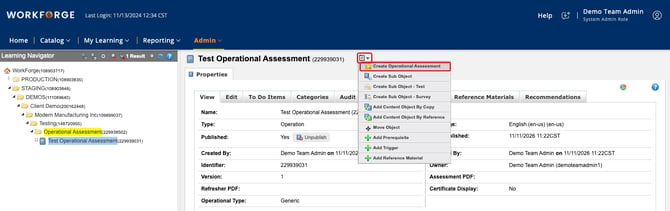
Select the content object you just created. From its menu, select Create Operational Assessment.
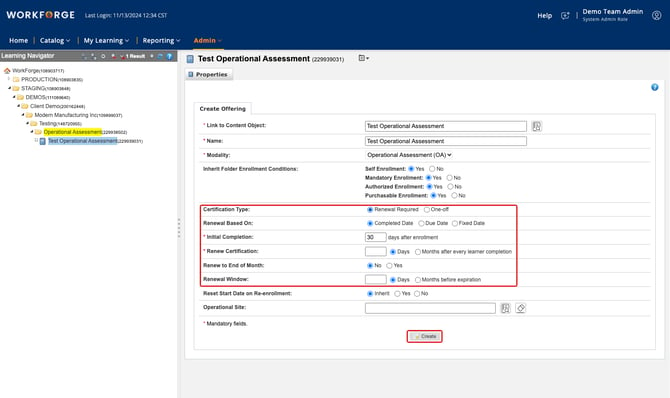
The Link to Content Object, Name and Modality fields fill in automatically. Next, set the certification fields:
- Certification Type: Select Renewal Required if learners must be reassessed on a schedule (for example, an annual equipment recertification). Select One-off if the assessment never expires.
- Renewal Based On: Choose whether the renewal cycle starts from the learner’s Completed Date, their Due Date, or a Fixed Date that is the same for everyone.
- Initial Completion: The number of days after enrollment that the first assessment is due.
- Renew Certification: How long the certification lasts after each completion, in days or months.
- Renew to End of Month: Select Yes to move each expiration date to the last day of that month.
- Renewal Window: How far ahead of expiration, in days or months, the learner is re-enrolled.
- Operational Site: Optional. Use this only if site management is set up for your account.
Click Create.
Setting Up Operation Assessors
Operation Assessors and Team Leaders can mark completions on Operational Assessments. The Operation Assessor role is focused on marking completions for the Operational Assessments that assessor has access to.
To make an existing user an Operation Assessor, a resource of the type Operation Assessor is created for them. Submit a request to the WorkForge Support team and we’ll set it up.
This article was last updated on November 11, 2026.